A Razer gaming chair is a solid choice if you want good back support for long sessions and can pay more than you would for a budget brand.
The right model depends on how you sit, how warm your room gets, and how much you want to spend.Razer launched its first chair, the Iskur, in 2020.
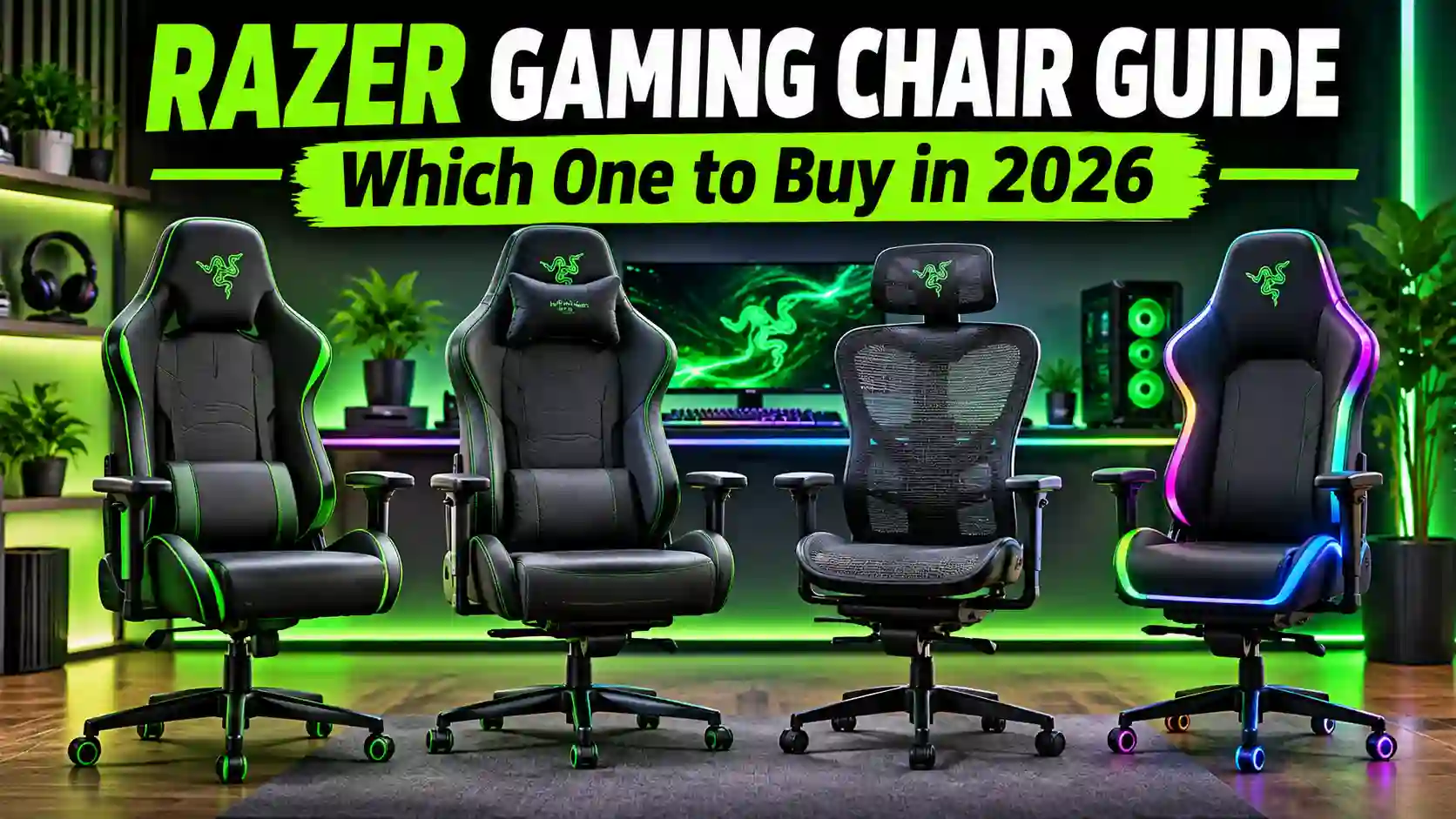
The lineup now includes the Iskur V2, the Enki, the Fujin, and the RGB-lit Soma Chroma, which is a lot to sort through.
This guide compares each model in plain English, with honest pros, cons, and who should skip it. Prices vary by country, so check Razer’s official site for current numbers. We do not sell chairs here, as this is an information page only.
What Makes a Razer Gaming Chair Different?
A Razer gaming chair costs more than many rivals, so it needs to offer something extra. Here is where Razer puts its effort, and where it falls short.
Ergonomics and Lumbar Support
“Ergonomic” means a chair shaped to support your body. “Lumbar support” is the part that cushions your lower back. Razer’s Iskur line is built around an adjustable, adaptive lumbar system. TechRadar’s review of the original Iskur called its lumbar support excellent, especially for people with lower back pain.
The catch is price. Digital Trends noted that much cheaper chairs exist, such as the Corsair TC100.
Materials: Fabric, Leather, and Mesh
Razer uses different materials across its chairs. The Enki line uses synthetic leather, and the Enki Pro uses Alcantara, a soft suede-like fabric. The Iskur V2 X uses plush fabric, and the Fujin uses breathable mesh. Check each product page for exact details.
Chroma RGB and Haptics
The newer Soma Chroma adds Chroma, Razer’s RGB lighting system. “RGB” means colored lights you can customize. The lights can react to supported games, though Gizmodo questioned the point of lights you rarely see while playing. Razer also sells chairs and cushions with “haptics,” which are vibrations that match on-screen action.
Razer Gaming Chair Lineup Compared
Razer sells several chairs, and the names can blur together. Think of the lineup as four families. The Iskur is built around ergonomics, the Enki around all-day comfort, the Fujin around airflow, and the Soma Chroma around lighting. Part one covers the Iskur and Enki chairs.
Razer Iskur V2 NewGen: Best for Ergonomics
The Razer Iskur V2 is the chair Razer promotes as its best ergonomic option. It has adaptive lumbar support, which means the lower back cushion adjusts to fit your spine at different angles.
Digital Trends reviewed it and said the base and adjustable lumbar support stand out most. The reviewer also liked the open design around the shoulders, so you don’t feel crammed in. The chair comes with a memory foam pillow and has the usual racer-style look with green trim.
The downside is price. You can find much cheaper chairs, and some buyers won’t see the point in paying more. Check Razer’s site for the current price, since it changes by country.
Razer Iskur V2 X NewGen: Best for a Cheaper Iskur
The Iskur V2 X is the lower-priced sibling. Razer and retailers describe it as using multi-layered fabric upholstery, which means a plush, padded cover instead of leather.
One Australian retailer, JB Hi-Fi, lists it for users up to 136 kg with a 36-month warranty. It was priced at $449 there (as of [verify date, November 2026], in Australian dollars). Warranty terms and weight limits can differ by region, so check where you live.
Reviews are mostly positive. On Best Buy, the light gray version had a 4.4 rating from 11 reviews when I checked. One buyer praised the comfort but mentioned a squeaky sound when sitting down abruptly. That is a small sample, so treat it as a warning to test the chair, not as proof of a defect.
I could not verify exactly which features the V2 X drops compared with the V2. Check Razer’s comparison details before buying.
Razer Enki Pro: Best for Premium Comfort
The Enki Pro is Razer’s top comfort chair. Razer says it uses Alcantara, a soft suede-like material, and lists plush finishing, tuned cushion density, and better weight distribution as its main features.
It is built for people who sit for hours, whether gaming or working. The trade-off is likely cost. Premium materials rarely come cheap, so confirm the price on Razer’s site first.
Razer Enki and Enki X: Best for All-Day Sitting on a Budget
The Razer Enki is the standard comfort chair in the family. The Enki X is the “essential” version, which Razer positions as the simpler, lower-priced option. Both use synthetic leather, according to the Staples listing.
Synthetic leather looks sharp and is easy to wipe clean. It is generally less breathable than mesh, though, so it can feel warm in hot rooms. That is where the Fujin, covered next, makes more sense.
I did not find independent reviews of the Enki chairs in my search, so read a few before buying.
Razer Fujin: Best for Hot Rooms
The Razer Fujin is the mesh option. Razer says its premium mesh lets air flow through and moves with you as you change your sitting position. Staples lists it as a mesh nylon ergonomic lounger-style chair.
Mesh is a breathable netting, so it tends to stay cooler than leather or thick fabric. If your room gets warm, that matters on long sessions.
The trade-offs are less certain. Mesh chairs usually feel firmer and less padded than plush ones, but that is general knowledge, not something I found in a Fujin review. I did not find an independent Fujin review in my search, so read a few before you buy. Check Razer’s site for the price and weight limit.
Razer Soma Chroma: Best for RGB Fans
The Razer Soma Chroma is the newest and most unusual chair here. Razer’s press release calls it a wireless RGB gaming chair and the first in a new line of “immersive” chairs. It is also Razer’s first RGB chair.
“Immersive” here means the chair reacts to what is on screen. Dexerto reports that the lighting responds to supported games and syncs with Razer’s Chroma ecosystem. Shacknews says you can customize the colors in the Razer Chroma app.
Reviews are mixed. Windows Central was positive, saying it was better than expected. Gizmodo was more critical, and its review title called it an awkward beginning for immersive furniture. Gizmodo liked the comfort and ergonomics, especially for people who prefer harder cushions. It questioned the point of RGB lights you rarely see while playing. It also noted that Razer expects players to supply their own way to power the chair.
I could not verify the exact release date, price, or list of supported games. Shacknews covered the announcement in June 2026, so this is a very new product. Check Razer’s site for current details.
Razer Clio: An Add-On, Not a Chair
The Razer Clio is a cushion, not a full chair. Razer describes it as a wireless speaker head cushion with THX Spatial Audio, which is a surround-style sound effect. It attaches to compatible gaming chairs with adjustable straps.
The Clio X is a gaming cushion powered by Razer Sensa HD Haptics. Haptics are small vibrations that match what you see and hear in a game.
These are optional extras. They only make sense if you already have a compatible chair, so check the product page for compatibility. I did not find independent reviews, so I can’t say whether they are worth the money.
Razer Gaming Chair Comparison Table
| Model | Material | Best for | Main drawback | Price |
| Iskur V2 NewGen | Fabric | Ergonomics | Costs more than rivals | Check Razer |
| Iskur V2 X NewGen | Plush fabric | A cheaper Iskur | Some buyers report squeaks | Check Razer |
| Enki Pro | Alcantara | Premium comfort | Likely the higher price | Check Razer |
| Enki / Enki X | Synthetic leather | Budget comfort | Can run warm | Check Razer |
| Fujin | Mesh | Hot rooms | Few independent reviews found | Check Razer |
| Soma Chroma | Not verified | RGB lighting | Lights hard to see in play | Check Razer |
Pros and Cons of Buying a Razer Gaming Chair
A fair Razer gaming chair review has to cover both sides. Here is what reviewers and buyers say, based on the sources I found.
What Razer Gets Right
Back support. This is the most praised feature. TechRadar called the original Iskur’s lumbar support excellent, especially for people who get lower back pain from long sitting.
Brand trust. A Best Buy reviewer said the Iskur brought legitimacy to a market flooded with cheap off-brand chairs that other gaming companies put their logos on. Razer designed its chairs itself and built them around posture.
Comfort. Digital Trends said Razer makes the money you spend on the Iskur V2 feel worth it. Gizmodo called the Soma Chroma comfortable and ergonomic, especially for people who like firm cushions.
Range of choices. You can pick fabric, synthetic leather, or mesh, depending on your room and budget.
Warranty program. Razer’s store advertises a 5-year extended warranty program. Terms vary by region, so read the details before you rely on it.
Where It Falls Short
Price. Digital Trends admitted that much cheaper chairs exist. TechRadar said the original Iskur felt like a $500 chair, which is a lot for a first purchase.
Possible squeaks. One Best Buy buyer called the Iskur V2 X comfortable and well made but noticed a squeak when sitting down abruptly. It is a single review, so don’t treat it as a rule.
Limited styling. TechRadar noted the original Iskur came in one color, matte black with green trim. Newer models add light grey, but check each listing.
RGB that may not matter. Gizmodo questioned the point of lights you never see while playing. It also said Razer expects you to find your own way to power the Soma Chroma.
Thin reviews on some models. I found few independent reviews for the Enki and Fujin chairs.
Is a Razer Gaming Chair Worth It vs Cheaper Rivals?
It depends on how much you sit. If you game or work for several hours a day, back support matters more than the logo. If you sit for an hour or two, a cheaper chair may be enough.
How Razer Compares
Digital Trends named two cheaper options when reviewing the Iskur V2: the Corsair TC100 and the Cooler Master Caliber X2. The reviewer still said Razer makes the extra money feel worth it, mainly because of the base and the adjustable lumbar support.
That is one reviewer’s opinion, not a rule. I did not verify current prices or specs for the rival chairs, so compare them on each brand’s official site before buying.
When the Premium Makes Sense
- You sit for long stretches and want adjustable lumbar support.
- You want a brand that designs its own chairs. One Best Buy reviewer praised Razer for standing out from cheap off-brand chairs that other companies just put their logo on.
- You want options such as mesh or RGB that fit your room.
When It Doesn’t
- Your budget is tight, and a cheaper chair from a known brand would do the job.
- You mostly game in short sessions.
- You want RGB lights that you will actually see. Gizmodo questioned this for the Soma Chroma.
A good test is to sit in the chair first if you can. Comfort is personal, and no review can replace trying it.
Which Razer Gaming Chair Should You Buy?
There is no single best Razer gaming chair for everyone. The right pick depends on how you sit, your room, and your budget. These picks come from the sources above, so check Razer’s site for current prices before you decide.
For Long Gaming Sessions
Start with the Iskur V2 NewGen. Razer promotes it as its best ergonomic chair, and Digital Trends praised the base and adjustable lumbar support. If you want maximum softness instead, the Enki Pro is Razer’s premium comfort chair.
For a Tight Budget
Look at the Iskur V2 X or the Enki X. The V2 X is the cheaper Iskur, and the Enki X is Razer’s “essential” comfort chair. I could not verify the price gap, so compare them on Razer’s site. If neither fits your budget, the cheaper rivals from the last section may be the smarter buy.
For Hot Rooms
Pick the Fujin. Razer says its mesh lets air flow through, and mesh generally stays cooler than leather. Read a few buyer reviews first, since I found no independent Fujin review.
For RGB Setups
The Soma Chroma is the only Razer chair here with built-in lighting that reacts to supported games. It is also very new and the reviews are mixed, so wait for more feedback if you are cautious.
Who Should Skip Razer Entirely
Skip Razer if you only game for an hour or two a day, or if a cheaper chair already feels comfortable. Also skip it if you can’t check the weight limit and sizing for your body. Those limits vary by model.
Buying and Setup Tips
A few simple checks before you order, and a few after the box arrives, can save you a return.
Check the Weight Limit and Your Size
Weight limits differ by model. JB Hi-Fi lists the Iskur V2 X as built for users up to 136 kg, but I did not verify the other models. Look up the limit and the recommended height on Razer’s product page for the exact chair you want. If you are tall, short, or heavier than average, this check matters more than any review.
Assembly and Common Mistakes
Most gaming chairs arrive in pieces, so set aside time to build yours. These tips are general advice, not from a Razer source:
- Lay out all parts and follow the manual in order.
- Don’t fully tighten bolts until everything is attached, then tighten them all.
- Set the lumbar support after you sit down, not before.
- Recheck the bolts after the first week. One Best Buy buyer reported a squeak, and loose parts are a common cause of noise, though I can’t say that was the cause there.
A chair mat can also help protect your floor. Staples sells them next to its Razer chairs.
Where to Buy and Warranty
Razer sells chairs on its own store, and retailers like Best Buy, Staples, and JB Hi-Fi list them too. Razer’s store advertises a 5-year extended warranty program, while JB Hi-Fi lists a 36-month manufacturer’s warranty on the Iskur V2 X. Terms vary by country and seller, so read the warranty details before you pay. We don’t sell chairs on this site.
FAQs
Is a Razer gaming chair worth the money?
It can be, if you sit for long hours and want adjustable lumbar support. Digital Trends said Razer makes the money you spend on the Iskur V2 feel worth it, though it admitted much cheaper chairs exist. If you sit for an hour or two a day, a cheaper chair may do the job.
Which Razer gaming chair is best for back pain?
The Iskur line is the best place to start. Razer built it around adaptive lumbar support, and TechRadar called the original Iskur’s lumbar support excellent for people with lower back pain. I can’t give medical advice, so if you have ongoing pain, talk to a doctor or physiotherapist. A chair alone may not fix it.
What is the difference between the Iskur V2 and Iskur V2 X?
The V2 X is the lower-priced Iskur, and retailers describe it as using multi-layered fabric upholstery. I could not verify exactly which features the V2 X drops, so compare the two spec pages on Razer’s site before buying.
How much weight can a Razer gaming chair hold?
It depends on the model. JB Hi-Fi lists the Iskur V2 X as designed for users up to 136 kg. I did not verify limits for the other chairs, so check the product page for the exact model you want.
Does the Razer Soma Chroma work with all games?
No. Dexerto says the lighting reacts to supported games, so it does not work with every title. I could not find a full list of supported games, so check Razer’s official site for the current list. The chair also syncs with Razer’s Chroma lighting system.
Final Verdict
A Razer gaming chair is worth considering if you sit for long hours and want strong back support from a well-known brand.
The Iskur V2 is the pick for ergonomics, the Enki line suits all-day comfort, the Fujin suits hot rooms, and the Soma Chroma suits RGB fans.It is not the cheapest route, and some models have few independent reviews.
Check prices, weight limits, and warranty terms on Razer’s official site before you buy, and sit in the chair first if you can. Lineups and prices change, so this guide reflects what I could verify in November 2026.